<!-- class: inverse, center, title-slide, middle --> class: center, middle <style> g { color: rgb(0,130,155) } r { color: rgb(174,77,41) } y { color: rgb(177,148,40) } </style> # Lecture 06: Geospatial Data Sciences # and Economic Spatial Models ## <img src="figs/bse_primary_logo.png" style="width: 35%" /><br><br>Bruno Conte ## 11-12/Feb/2026 --- # Geospatial Data and Spatial Models: Schedule 1. ~~Introduction to (spatial) data and programming in `R`~~ **[08/Jan/2026]** 2. ~~Week 2-4: Vector spatial data~~ **[14 - 29/Jan/2026]** 3. Week 5-7: Raster spatial data + (basic) interactive tools **[05 - 19/Feb/2026]** - ~~Week 5: Raster basics and unary operations using `sf` and `terra`~~ - Week 6: Vector-raster operations - Week 7: Interactive tools with `leaflet` and APIs 4. Week 8-10: Spatial models and applications with data **[25/Feb - 12 Mar/2026]**<br> <br> 5. <span style="color: rgb(177,148,40)">Take-home exam</span> **[27/Mar/2026]** --- # Main references for this class 1. Lovelace, R., Nowosad, J. and Muenchow, J., 2019. <g>**Geocomputation with R.**</g> Chapman and Hall/CRC. - Chapters 2.3, 3.3, 4.3, 5.3, and 6 2. Pebesma, E., 2018. Simple Features for R: Standardized Support for Spatial Vector Data. The R Journal 10 (1), 439-446 3. Wickham, H. and Grolemund, G., 2016. R for data science: import, tidy, transform, visualize, and model data. " O'Reilly Media, Inc.". --- # Raster basics: loading, creating, and operations with rasters .pull-left[ - ~~Creating and~~ **loading rasters** with `terra` (external files) - ~~<r>Unary</r> operations:~~ - ~~Cropping~~ - ~~Vectorization~~ ] .pull-right[ - <g>Vector-raster</g> operations: - Data extraction - Zonal statistics - Rasterize - Distances over networks using rasters ] -- Requires **additional libraries** on top of `sf` 1. `terra`: contains most of the <r>**raster-related functions**</r> 2. `exactextractr`: performs high-performance <y>zonal statistics</y> 3. `gdistance`: used to calculate <g>distances over raster</g> --- # Raster basics: loading rasters - Loading rasters with `terra::rast()` - <g>**Most used format:**</g> `.tif` (nightlight example [<u>here</u>](https://www.dropbox.com/scl/fi/yu7b30oxiypy8q7o8312d/F101992.v4b_web.stable_lights.avg_vis.tif?rlkey=ysegpnnns8oz8khnykhc1ebkz&dl=1)) - Multilayer format: NetCDF `*.nc` (drought example [<u>here</u>](https://www.dropbox.com/scl/fi/kmo2gj0iqvu52rat9ydmt/spei01.nc?rlkey=1ahg7k4cs1uf1v52s5x6d0sxj&dl=1)) -- ```r library(terra) r.nlights <- rast('../../Research/Data/gis data/NL NOAA Version 4 DMSP-OLS/F101992.v4/F101992.v4b_web.stable_lights.avg_vis.tif') *r.nlights ``` ``` ## class : SpatRaster ## dimensions : 16801, 43201, 1 (nrow, ncol, nlyr) ## resolution : 0.008333333, 0.008333333 (x, y) ## extent : -180.0042, 180.0042, -65.00417, 75.00417 (xmin, xmax, ymin, ymax) ## coord. ref. : lon/lat WGS 84 (EPSG:4326) ## source : F101992.v4b_web.stable_lights.avg_vis.tif ## name : F101992.v4b_web.stable_lights.avg_vis ## min value : 0 ## max value : 63 ``` --- # Raster basics: loading rasters ```r *plot(r.nlights) ``` 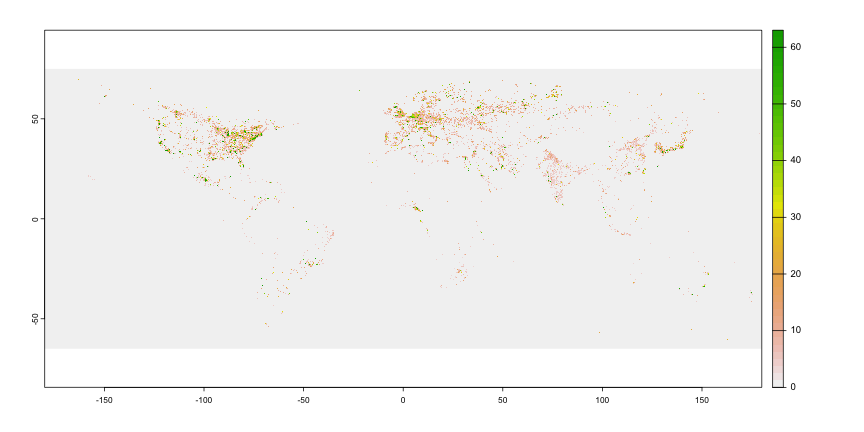<!-- --> --- # Raster basics: loading rasters - Loading rasters with `terra::rast()` - Most used format: `.tif` (nightlight example [<u>here</u>](https://www.dropbox.com/scl/fi/yu7b30oxiypy8q7o8312d/F101992.v4b_web.stable_lights.avg_vis.tif?rlkey=ysegpnnns8oz8khnykhc1ebkz&dl=1)) - <g>**Multilayer format:**</g> NetCDF `*.nc` (drought example [<u>here</u>](https://www.dropbox.com/scl/fi/kmo2gj0iqvu52rat9ydmt/spei01.nc?rlkey=1ahg7k4cs1uf1v52s5x6d0sxj&dl=1)) ```r library(terra) r.spei <- rast('../../Research/Data/gis data/spei/spei01.nc') *r.spei ``` ``` ## class : SpatRaster ## dimensions : 360, 720, 1380 (nrow, ncol, nlyr) ## resolution : 0.5, 0.5 (x, y) ## extent : -180, 180, -90, 90 (xmin, xmax, ymin, ymax) ## coord. ref. : lon/lat WGS 84 ## source : spei01.nc ## varname : spei (Standardized Precipitation-Evapotranspiration Index) ## names : spei_1, spei_2, spei_3, spei_4, spei_5, spei_6, ... ## unit : z-values, z-values, z-values, z-values, z-values, z-values, ... ## time : 1901-01-16 to 2015-12-16 ``` --- # Raster basics: loading rasters ```r *plot(r.spei[[1]]) # note the [[x]]!! ``` 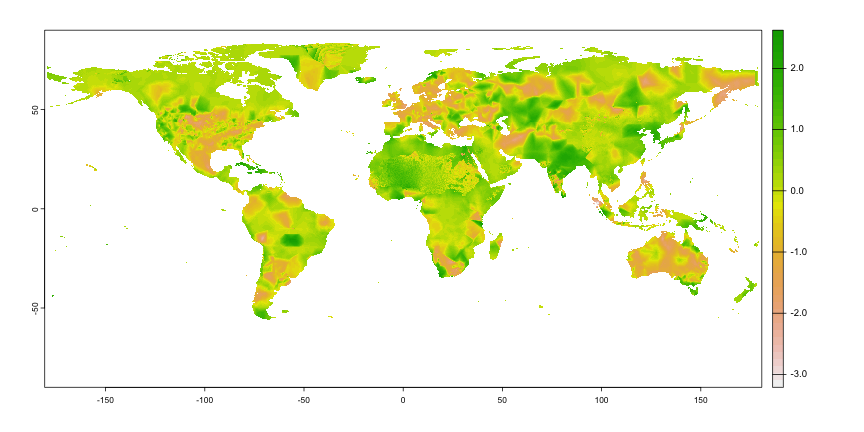<!-- --> --- # Raster basics: loading rasters ```r *plot(r.spei[[10]]) # note the [[x]]!! ``` 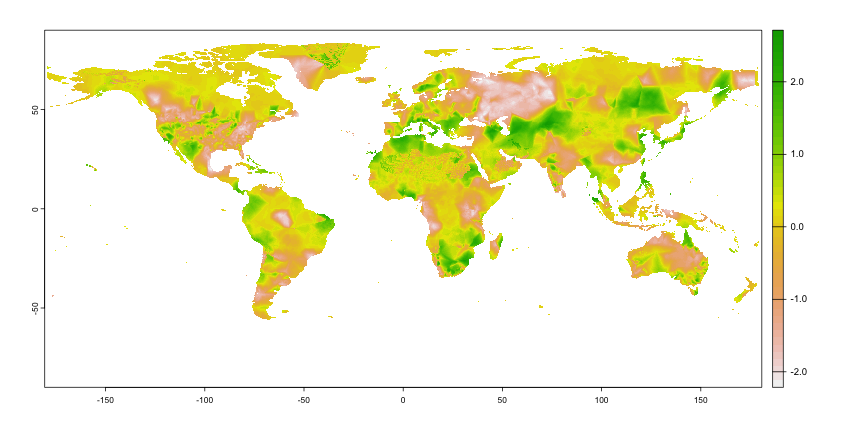<!-- --> --- # Raster basics: loading rasters ```r *plot(r.spei[[15]]) # note the [[x]]!! ``` 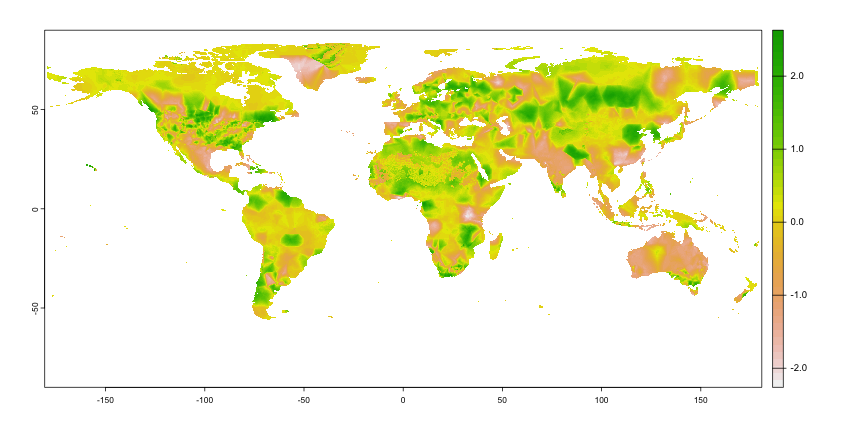<!-- --> --- # Raster basics: loading rasters ```r *plot(r.spei[[20]]) # note the [[x]]!! ``` <!-- --> --- # Raster-vector operations: data extraction .pull-left[ - Vector-raster <g>**data extraction**</g>: - Extracts values where vector vertices overlay the raster with `extract` - Interaction between `sf` and `terra` objects - <r>**Required standardization:**</r> from `sf` vector into `SpatVec()` ] .pull-right[ <img src="https://tmieno2.github.io/R-as-GIS-for-Economists/R_GIS_Book_files/figure-html/illustrate-points-1.png" style="width: 100%" /> ] --- # Raster-vector operations: data extraction .pull-left[ - Vector-raster <g>**data extraction**</g>: - Extracts values where vector vertices overlay the raster with `extract` - Interaction between `sf` and `terra` objects - <r>**Required standardization:**</r> from `sf` vector into `SpatVec()` - Polygon extraction retrieves <y>multiple values</y> (one for each vertex) ] .pull-right[ <img src="https://tmieno2.github.io/R-as-GIS-for-Economists/R_GIS_Book_files/figure-html/polygons-extact-viz-1.png" style="width: 100%" /> ] --- # Raster-vector operations: zonal statistics .pull-left[ - Vector-raster <g>**zonal statistics**</g>: - <r>Calculates statistics</r> (e.g., average) of the overlaying raster values within a ploygon - Potentially CPU-demanding: efficient `exactextractr::exact_extract` - Allows for <y>multiple statistics</y> - Deals with <g>multi-layer rasters</g> ] .pull-right[ <img src="https://tmieno2.github.io/R-as-GIS-for-Economists/R_GIS_Book_files/figure-html/polygons-extact-viz-1.png" style="width: 100%" /> ] --- # Raster-vector operations: zonal statistics .pull-left[ - Vector-raster <g>**zonal statistics**</g>: - <r>Calculates statistics</r> (e.g., average) of the overlaying raster values within a ploygon - Potentially CPU-demanding: efficient `exactextractr::exact_extract` - Allows for <y>multiple statistics</y> - Deals with <g>multi-layer rasters</g> ] .pull-right[ <img src="figs/elev_error_1.png" style="width: 100%" /> ] --- # Raster-vector operations: zonal statistics .pull-left[ - Vector-raster <g>**zonal statistics**</g>: - <r>Calculates statistics</r> (e.g., average) of the overlaying raster values within a ploygon - Potentially CPU-demanding: efficient `exactextractr::exact_extract` - Allows for <y>multiple statistics</y> - Deals with <g>multi-layer rasters</g> ] .pull-right[ <img src="figs/elev_error_2.png" style="width: 100%" /> ] --- # Raster-vector operations: rasterizing vector data .pull-left[ - <g>**Rasterizing**</g> `sf` vector data: - <r>Transforms it</r> in a raster - Non-missing values for the intersecting raster pixels - CPU demanding and rarely useful ] .pull-right[ <img src="figs/river_rasterize_1.png" style="width: 90%" /> ] --- # Raster-vector operations: rasterizing vector data .pull-left[ - <g>**Rasterizing**</g> `sf` vector data: - <r>Transforms it</r> in a raster - Non-missing values for the intersecting raster pixels - CPU demanding and rarely useful ] .pull-right[ <img src="figs/river_rasterize_2.png" style="width: 90%" /> ] --- # Raster-vector operations: rasterizing vector data .pull-left[ - <g>**Rasterizing**</g> `sf` vector data: - <r>Transforms it</r> in a raster - Non-missing values for the intersecting raster pixels - CPU demanding and rarely useful - <y>**Exeption:**</y> distance calculation over <g>friction surfaces</g> - Intuition: distance between two ports over the river ] .pull-right[ <img src="figs/river_rasterize_3.png" style="width: 90%" /> ] --- # Raster-vector operations: rasterizing vector data .pull-left[ <u>Step-by-step</u> for distances: * <g>Rasterize</g> the network with `rasterize()` * <r>Transform</r> the raster into a `transition()` matrix * <y>Distance between two points</y> with `shortestPath()` <u>Additional packages:</u> * `raster`, `gdistance`, and `sp` ] .pull-right[ <img src="figs/river_rasterize_3.png" style="width: 90%" /> ] --- # Raster-vector operations: rasterizing vector data .pull-left[ - `terra::rasterize()` needs two inputs: 1. <g>Vector input:</g> as `SpatVector` - Use `terra::vect(sf object)` 2. <r>Template raster:</r> resolution/extent will be used for the rasterized vector - Inpus must have the <u>same projection</u> - Details in `01_class06.R` ] .pull-right[ ```r library(terra) library(sf) # Rasterize syntax: rasterized.vector <- rasterize( # sf vector as SpatVector: x = vect(sf.object), # template raster: y = raster.template ) ``` ] --- # Raster-vector operations: transition matrices .pull-left[ - `gdistance::transition()` needs three inputs: 1. <g>Raster surface</g> as `raster` with: - `raster::raster(SpatRaster)` 2. <r>Transition function:</r> tells whether increasing/decreasing on raster values 3. <y>Directions of transitions</y> (8 = all neighb. pixels) - Details in `01_class06.R` ] .pull-right[ ```r library(terra) library(sf) library(gdistance) library(raster) # Tr. matrix syntax: tr.matrix <- transition( # Surface as raster::raster() object! x = raster::raster(raster.surface), # Increasing/decreasing function transitionFunction = mean, # Directions (use 8) directions = 8 ) ``` ] --- # Raster-vector operations: distances over transition matrices .pull-left[ - `gdistance::shortestPath()` needs four inputs: 1. <g>Transition matrix</g> 2. <r>Origin and goal (destination)</r> as `sp` - Use `sf::as_Spatial(sf)` 3. <y>Output type</y> (`SpatialLines` = linestring) - Details in `01_class06.R` ] .pull-right[ ```r library(terra) library(sf) library(gdistance) library(raster) # Distance syntax: sp.distance <- shortestPath( # Tr. matrix: x = tr.matrix, # Origin point: origin = as_Spatial(sf.points[1,]), # Destination point: goal = as_Spatial(sf.points[2,]), # Output type: output = "SpatialLines" ) ``` ] --- class: center, middle # Your turn: Hands-on --- # Hands-on: your turn! (1/2) .pull-left[ Calculating **climate change** in USA - Use the `us_states` data on the geography of US states - Combine it with the [<u>SPEI index</u>](https://www.dropbox.com/scl/fi/kmo2gj0iqvu52rat9ydmt/spei01.nc?rlkey=1ahg7k4cs1uf1v52s5x6d0sxj&dl=1): - Retrieve average SPEI index across states - Do so for 3-4 different years - Visualize it: ] .pull-right[ .center[ <img src="figs/raster03.png" style="width: 100%" /><br> <img src="figs/raster04.png" style="width: 100%" /> ] ] --- # Hands-on: your turn! (2/2) .pull-left[ Geography and **bilateral distances** in Spain - Use the `ne_10m_populated_places` [<u>shapefile</u>](https://www.naturalearthdata.com/downloads/10m-cultural-vectors/10m-populated-places/) to retrieve the **10 top-populated places** in Spain - Crop the elevation data from `MSR_50M.tif` [<u>raster</u>](https://www.naturalearthdata.com/downloads/50m-raster-data/50m-manual-shaded-relief/) within Spain - Visualize them together with `plot()` function - Calculate the path and distance between Madrid and Vigo - Hint: approx. 640 km! ] .pull-right[ .center[ <img src="figs/raster05.png" style="width: 100%" /> ] ] --- counter: false # Hands-on: your turn! (2/2) .pull-left[ Geography and **bilateral distances** in Spain - Use the `ne_10m_populated_places` [shapefile](https://www.naturalearthdata.com/downloads/10m-cultural-vectors/10m-populated-places/) to retrieve the **10 top-populated places** in Spain - Crop the elevation data from `MSR_50M.tif` [<u>raster</u>](https://www.naturalearthdata.com/downloads/50m-raster-data/50m-manual-shaded-relief/) within Spain - Visualize them together with `plot()` function - Calculate the path and distance between Madrid and Vigo - Hint: approx. 640 km! ] .pull-right[ .center[ <img src="figs/raster06.png" style="width: 100%" /> ] ] --- class: center, middle # Your turn: Take-home # Assignment --- # Take-home assignment ## Important 1: you are not expected to replicate the images identically (rather, qualitatively!) ## Important 2: Check classroom for clarifications (and email me if needed)! ## Deadline: 23:59 pm of March 3-4 (day before the class, as usual) --- # Take-home assignment (1/2) .pull-left[ Calculating **climate change** in USA - Use the `us_states` data on the geography of US states - Retrieve average SPEI index across **regions** for the past 50 years - Retrieve the dataset as a panel (time series for each region) - Plot the evolution of the SPEI index for each region - `geom_smooth()`: calculate the average across regions ] .pull-right[ .center[ <img src="figs/raster09.png" style="width: 100%" /> ] ] --- # Take-home assignment (2/2) .pull-left[ <g>Transportation centrality</g> and isolation - Use the `ne_10m_populated_places` shapefile to retrieve the **10 top-populated places** - Crop the `ne_10m_roads` road data within Spain - Build a raster/friction surface; calculate distances between **all city pairs** - Bilateral distances if coming from Madrid vs. Vigo: <r>who is more isolated?</r> - `geom_density()`: calculates "smoothed" distributions ] .pull-right[ .center[ <img src="figs/raster07.png" style="width: 100%" /> ] ] --- counter: false # Take-home assignment (2/2) .pull-left[ <g>Transportation centrality</g> and isolation - Use the `ne_10m_populated_places` shapefile to retrieve the **10 top-populated places** - Crop the `ne_10m_roads` road data within Spain - Build a raster/friction surface; calculate distances between **all city pairs** - Bilateral distances if coming from Madrid vs. Vigo: <r>who is more isolated?</r> - `geom_density()`: calculates "smoothed" distributions ] .pull-right[ .center[ <img src="figs/raster08.png" style="width: 100%" /> ] ]